Week 6.2
Week 6.2
🏷️ Replace this section with some keywords that can be used for searching, tagging and the indexing of this page.
Sections
🌱 Links to all Heading1 Blocks in this page.
- Evaluation using a Stack
1.0 - Evaluation using a Stack
- This content was taught in Lecture 6.1
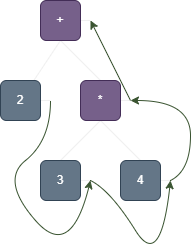
🌱 Consider evaluating the expression using a Stack Machine
- Performing a Post-Order Traversal on the expression tree gives us the Polish notation
- We use the Polish notation order of the arguments to generate code for the stack machine for evaluating that expression
// LOADCON X loads the constant X onto the top of the stack
LOADCON 2
LOADCON 3
LOADCON 4
MUL
ADD
Executing LOADCON 2 puts the constant 2 onto the top of the stack
Executing LOADCON 3 puts the constant 3 on the top of the stack
Executing LOADCON 4 puts the constant on the top of the stack
The MUL operation pulls the first two items off the stack and pushes the result of multiplying the first two items back onto the stack. Therefore, we pop off the stack, and write onto the stack
Like the MUL operation, the ADD operation pulls the first two items off the stack, and pushes the result of adding the two items back onto the stack. Therefore, we pop off off the stack, and write to the stack.
🌱 Consider evaluating the expression using a stack machine
LOADCON 3
LOADCON 2
LESS
Executing LOADCON 3 puts the constant 3 at the top of the stack
Executing LOADCON 2 puts the constant 2 at the top of the stack
Executing LESS pops the top two items off the stack, evaluates the conditional and pops the value back onto the stack. Here we use
FALSE=0andTRUE=1
1.1 - Code Generation Schemes for Expressions
1.1.1 - Code Generation Scheme for Binary Expressions
After we evaluate an expression using a stack machine, the value of that expression will be left on top of that stack.
Therefore, if we wanted to generate code to evaluate a binary expression of the form then the code will be of the form
Code to evaluate e_1
Code to evaluate e_2
ADD
1.1.2 - Code Generation Scheme for Unary Expressions
Similarly to binary expressions, we use a similar template or scheme to generate code for unary expressions
Therefore, if we wanted to generate code to evaluate a unary expression of the form , then the code will be of the form
Code to evaluate e
NEGATE
1.1.3 - Code Generation Scheme for an Assignment
🌱 How do we generate code for an assignment, of the form that involve local variables (i.e. variables on the stack; defined in the current procedure).
- Let and be variables that are defined in the current procedure (i.e. they are local variables).
- Since and are local variables that are stored in the current procedure’s stack frame, they will be stored at some offset from the frame pointer (the address of the start of the frame).
- The first few sections of a stack frame are typically used for encoding information related to procedure calls, e.g. Static Link, Dynamic Link and Return Address (to be discussed later)
- Therefore, let’s set at an arbitrary offset of 3, and at an arbitrary offset 4.
- Given that we know where they are, how do we write code to execute the assignment operation?
Firstly, we evaluate the expression, so that we get the value to be assigned
LOADCON 3 // Add 3 to the top of the stack stack = [3] LOADFRAME // Get the value at address (framePtr + 3) and push on top of stack stack = [42] // Suppose 42 is the value of x LOADCON 1 // Code for evaluating constant 1 stack = [42, 1] ADD // Add operation stack = [43]- The LOADFRAME instruction pops the value that’s on top of the stack (which is the address offset with respect to the frame pointer for the value that we want to load.)
After evaluating the expression to be assigned, we need to load the address of the local variable to the top of the stack.
Since we know that the local variable is stored at an offset of , we load the constant 4 onto the stack
We the use the STOREFRAME command - it pops the address offset off the top of the stack, and then pops the value to be assigned (and then writes the value to the offset address).
LOADCON 4  // Load the constant 4 onto the top of the stack
	stack = [43, 4]
STOREFRAME // Write the value 43 to address (frame pointer + 4)
	stack = [] // Stack is now empty, besides the Static Link,
						 // Dynamic Link & Return Address
Summary
🌱 In the static analysis phase, we resolve the types of each of the variables (and thus know how big they are). At this point, we also assign the stack pointer offsets for each variable.
- If local variable is at an offset of 3 (relative to the frame pointer):
LOADCON 3Code to evaluate the offset of relative to the frame pointerLOADFRAMEStore onto the stack (if needed, this is where you’d insert code to evaluate the local variable, as we’ve done in the example above)LOADCON 4Code to evaluate the offset of relative to the frame pointer (At this point, the last entry on the stack should be the address offset of y, and the second-last entry the value to be assigned to y)STOREFRAMEWrite to the stack
1.1.4 - Code Generation Scheme for Conditional Statements
🌱 How do we generate code for a statement of the form if then else
LOADCON 3
LOADFRAME
ZERO
LESS

LOADCON 10
BR_FALSE

LOADCON 3
LOADFRAME
NEGATE
LOADCON 4
STOREFRAME

LOADCON 6
BR

LOADCON 3
LOADFRAME
LOADCON 4
STOREFRAME
First, we evaluate the conditional
Code for evaluating the condition LOADCON 3 is at an offset of 3 LOADFRAME is at an offset of 4 ZERO Push 0 onto the stack LESS Evaluate the condition Code to branch if false, to the code for LOADCON 10 Load how much we want to branch down if condition is false. Pops the amount to jump (10) and the value of the condition from the stack - If condition is false, jump 10 places down
- If condition is true, continue executing from the next instruction below. | | BR_FALSE | | | Code for (to be executed if the condition is TRUE) | n | LOADCON 3 | (2) | | | n+2 | LOADFRAME | (1) | | | n+3 | NEGATE | (1) | | | n+4 | LOADCON 4 | (2) | | | n+6 | STOREFRAME | (1) | | Code to branch to the first instruction after the first if statement - we don’t want to execute the IF code then the ELSE code | n+7 | LOADCON 6 | (2) | | | n+9 | BR | (1) | | Code for (to be executed if the condition is FALSE) | n+10 | LOADCON 3 | (2) | | | n+12 | LOADFRAME | (1) | | | n+13 | LOADCON 4 | (2) | | | n+15 | STOREFRAME | (1) | | | n+16 | … | … |
- In order to know where to branch to, we need to know how big the instructions are
LOADCON Xare two instruction words -LOADCONand the valueXitself.- All of the other instructions here are a single word in length.
1.1.5 - Code Generation for While Loops
🌱 How do we generate code for a while loop, of the form while cond do body end
- Let and
| Description | Size | Offset | Instruction |
|---|---|---|---|
| Code for evaluating the loop condition, cond | () | n | |
| Code to branch - if cond is false, go to the first instruction after the loop | () | n+ | LOAD_CON p |
| BR_FALSE | |||
| Code for executing the loop body | () | n+ | |
| Code for always branching to the first instruction of the loop | () | n+ | LOADCON -m |
| BR | |||
| {Code after the while statement} | n+m |
- Note here that we’re allowed to branch a negative amount, to jump upward / backward.
1.2 - Code Generation using the Tutorial6 PL0 Compiler
Here, we generate PL0 code using the PL0_LALR configuration, which runs the pl0.PL0_LALR compiler using the following flags:
-v -t
 # -v: verbose code generation
 # -t: trace through instruction-by-instruction execution.
1.2.1 - Simple Code Generation
We begin with trying to create stack machine code for a very simple PL0 program
var x : int;
	  y : int;
begin
		write 12 + 13
end
Running this code, we get the following output (self-added annotations start with #)
Compiling demo.pl0
Parsing complete
Static semantic analysis complete
Code generation complete
# Here's the code that's been generated for us (printed out as we used the -v flag)
Procedure <main>
    1000 : LOAD_CON(2)
    1002 : ALLOC_STACK # Allocate room for main method's variables on stack
											 # Allocate 2 words of space - we have two integers, x and y
											 # Works by pushing twice onto the stack
           // write _+_(12,13):
		# Code for executing the write statement
    # First step is to evaluate the expression (12 + 13)
    1003 : LOAD_CON(12)
    1005 : LOAD_CON(13)
    1007 : ADD
		# Pops the value on the top of the stack and write it to STDOUT
    # In typical code generation, wouldn't have a WRITE instruction
    # - much higher level instruction than normal.
    1008 : WRITE
    1009 : RETURN
Running ...
# Now, we run the code!
# Set up the activation record first
# Push the Static Link, Dynamic Link and Return Address to the top of the stack
# Meaningless for the main method
 Push(0(x0))  Push(0(x0))  Push(0(x0))
# Observe that the Program Counter is 1000, which is the same as is defined in the
# code above in line 6
# Here, the stack pointer is 3, as we have pushed 3 items onto the stack
#     static link, dynamic link and the return address of the main method
# The first instruction is LOADCON 2, which pushes the value 2 onto the stack.
# This is done to denote to the next operation ALLOC_STACK that we want to allocate
# two words of memory
PC: 1000 FP:     0 SP:     3 Limit:  1000 Opcode: LOAD_CON 2  Push(2(x2))
# Observe after the last intruction has been executed, the program counter has been
# incremented by 2, as the last instruction LOAD_CON 2 was two words long
# We now execute ALLOC_STACK which pushes two values onto the stack, allocating
# space for our two integers, x and y.
# The ALLOC_STACK function executes two instructions in this case.
# Firstly, it pops an entry off the stack - this is the number of spaces to create.
# Then, it pushes twice onto the stack, creating space for the two integers.
PC: 1002 FP:     0 SP:     4 Limit:  1000 Opcode: ALLOC_STACK  Pop() = 2(x2)  Push(-2139062144(x80808080))  Push(-2139062144(x80808080))
# We then start executing the code for the write statement.
# To start evaluating it, we push the two constants onto the stack.
PC: 1003 FP:     0 SP:     5 Limit:  1000 Opcode: LOAD_CON 12  Push(12(xc))
PC: 1005 FP:     0 SP:     6 Limit:  1000 Opcode: LOAD_CON 13  Push(13(xd))
# We then use the ADD instruction, which pops both 12 and 13 off the stack,
# adds the two values together and pushes the resulting value back onto the stack
PC: 1007 FP:     0 SP:     7 Limit:  1000 Opcode: ADD  Pop() = 13(xd)  Pop() = 12(xc)  Push(25(x19))
# Then, the WRITE instruction pops the value off the stack and writes it to
# STDOUT
PC: 1008 FP:     0 SP:     6 Limit:  1000 Opcode: WRITE  Pop() = 25(x19) 25
# We then execute the return statement
PC: 1009 FP:     0 SP:     5 Limit:  1000 Opcode: RETURN  Pop() = 0(x0)  Pop() = 0(x0)  Pop() = 0(x0)
      Exiting program

Terminated
1.2.3 - More Complex Code Generation
We extend the example above, by making use of the variables x and y.
var x : int;
	  y : int;
begin
		x := 12;
		y := 13;
		write x + y
end
The PL0 compiler’s output (As before, annotations begin with #)
Compiling demo.pl0
Parsing complete
Static semantic analysis complete
Code generation complete
Procedure <main>
		# As before, we still allocate space for our two variables x and y
    1000 : LOAD_CON(2)
    1002 : ALLOC_STACK
		# Here, we insert code to implement the assignment operation, where we write
    # the value 12 to the offset +3
           // assignment to x:
    1003 : LOAD_CON(12)
    1005 : LOAD_CON(3)
    1007 : STORE_FRAME # Writes the value 12 to address +offset 3
		# Here, we insert code to implement the assignment operation, where we write
    # the value 13 to the offset +4
           // assignment to y:
    1008 : LOAD_CON(13)
    1010 : LOAD_CON(4)
    1012 : STORE_FRAME # Writes the value 13 to address +offset 4
           // write _+_(Dereference(x),Dereference(y)):
		Here, we evaluate the the expressions x and y
    1013 : LOAD_CON(3) # Load offset of x into stack
    1015 : LOAD_FRAME  # Get value of x onto the stack
    1016 : LOAD_CON(4) # Load offset of y into the stack
    1018 : LOAD_FRAME  # Get the value of y onto the stack
    1019 : ADD         # Add the top two values on the stack (x+y)
    1020 : WRITE       # Pop from the stack, write the value
    1021 : RETURN
Running ...
 Push(0(x0))  Push(0(x0))  Push(0(x0))
PC: 1000 FP:     0 SP:     3 Limit:  1000 Opcode: LOAD_CON 2  Push(2(x2))
PC: 1002 FP:     0 SP:     4 Limit:  1000 Opcode: ALLOC_STACK  Pop() = 2(x2)  Push(-2139062144(x80808080))  Push(-2139062144(x80808080))
PC: 1003 FP:     0 SP:     5 Limit:  1000 Opcode: LOAD_CON 12  Push(12(xc))
PC: 1005 FP:     0 SP:     6 Limit:  1000 Opcode: LOAD_CON 3  Push(3(x3))
PC: 1007 FP:     0 SP:     7 Limit:  1000 Opcode: STORE_FRAME  Pop() = 3(x3)  Pop() = 12(xc)
    Store [3] <= 12(xc)
PC: 1008 FP:     0 SP:     5 Limit:  1000 Opcode: LOAD_CON 13  Push(13(xd))
PC: 1010 FP:     0 SP:     6 Limit:  1000 Opcode: LOAD_CON 4  Push(4(x4))
PC: 1012 FP:     0 SP:     7 Limit:  1000 Opcode: STORE_FRAME  Pop() = 4(x4)  Pop() = 13(xd)
    Store [4] <= 13(xd)
PC: 1013 FP:     0 SP:     5 Limit:  1000 Opcode: LOAD_CON 3  Push(3(x3))
PC: 1015 FP:     0 SP:     6 Limit:  1000 Opcode: LOAD_FRAME  Pop() = 3(x3)
    Load [3] => 12(xc) Push(12(xc))
PC: 1016 FP:     0 SP:     6 Limit:  1000 Opcode: LOAD_CON 4  Push(4(x4))
PC: 1018 FP:     0 SP:     7 Limit:  1000 Opcode: LOAD_FRAME  Pop() = 4(x4)
    Load [4] => 13(xd) Push(13(xd))
PC: 1019 FP:     0 SP:     7 Limit:  1000 Opcode: ADD  Pop() = 13(xd)  Pop() = 12(xc)  Push(25(x19))
PC: 1020 FP:     0 SP:     6 Limit:  1000 Opcode: WRITE  Pop() = 25(x19) 25

PC: 1021 FP:     0 SP:     5 Limit:  1000 Opcode: RETURN  Pop() = 0(x0)  Pop() = 0(x0)  Pop() = 0(x0)
      Exiting program

Terminated
No errors detected.

Process finished with exit code 0
1.3 - Stack Machine Instructions
🌱 This content is from the Stack Machine handout, in Appendix A.
NO_OP No Operation; Do nothing
BR Branch to PC + offset, where offset is the value at the top of the stack. The offset may be a negative number, to branch backwards
BR_FALSE Pop the value from the top of the stack - this is the offset. Branch to PC + offset if the second-last element on the stack (i.e. the value of the condition) is false.
COPY Pops three items of the stack - size, sourceAddress, destinationAddress
CALL Instruction for procedure calls.
RETURN Exit a procedure, restoring the frame pointer from the dynamic link, and the program counter from the return address.
ALLOC_STACK Pop a value from the top of the stack - this is the number of words to be allocated. Then perform that many PUSH operations to write a non-sensical hexadecimal value to the top of the stack - 0x80808080
DEALLOC_STACK Remove local variables from a stack, following a procedure call, where we have local variables assigned.
POP Discard the top element of the stack
DUP Duplicate the top of the stack
ADD Add the top two words on the stack, replacing them with their sum
MPY Multiply the top two words on the stack, replacing them with their product
DIV Divide the top second-top of the stack by the top of the stack, replacing them with their quotient
…
- We have the instructions
LESSandLESSEQ, but no instructions for greater than, or greater than or equal to- We can achieve this by simplify flipping the inequalities.
READ and WRITE are high-level instructions that you’d typically not have, but we include it as it makes our lives easier
READ Read an integer value from the input (one per line) and push the value onto the stack
WRITE Pop the stack and write it to the output (one per line)
BOUND We know that the top of the stack contains an upper bound, and the second-top of the stack contains a lower bound. These are popped. If the current top of the stack is not within these bounds (inclusive) then the machine gives an exception and halts, otherwise the value is left on top of the stack.
TO_GLOBAL Convert from an offset to an absolute (global) address by adding the frame pointer to it
TO_LOCAL Convert from an absolute address to an offset (top of stack - fp)
LOAD_CON c Push a constant , which may be negative onto the stack. This instruction is two words long
STORE_ABS Pop the absolute memory location (to write to) from the top of the stack, and write the value stored at that location to the top of the stack. write to memory
LOAD_ABS Pop the absolute memory location (to read from) from the top of the stack, and write the value stored at that memory location to the stack read from memory
STORE_FRAME Pop the offset at the top of the stack, and write the value at the new top of the stack to the address at .
LOAD_FRAME Relative version of LOAD_ABS instruction. Pop from the top of the stack the memory address offset. Write the value stored at to the memory address.
The following instructions are similar to LOADCON 0 and LOADCON 1, but we have them since it is something that we do often - only one word in size rather than two words.
ZERO Push the value zero (or false for Booleans) onto the top of the stack
ONE Push the value one (or True for Booleans) onto the top of the stack.
ALLOC_HEAP Allocate space on the top of the heap, and update the memory location that stores the location of the top of the heap.
LOAD_MULTI Load multiple items onto the stack from memory
STORE_MULTI Store multiple items from the stack in memory
STOP Stop the execution of the machine, with the top of the stack popped to get an exit code - different error messages associated with different exit codes.
2.0 - Stack Machine Emulator
🌱 The code for the Stack Machine Emulator is in the StackMachine class in the machine package.
In the
StackMachineclass, we have theexecInstructionmethod, which executes the instructions for the stack machine.It’s implemented using a big switch case, and executes different behaviour based on the instruction received.
switch (inst) {
		case NO_OP: /* Do nothing */
		    break;
		case BR: /* Unconditional branch */
		    int dest = pop(); /* destination offset */
		    pc += dest;       /* branch relative to pc */
		    if (tracing.contains(Trace.JUMPS)) {
		        outStream.print("\n      Branch => " + pc);
		    }
		    break;
		// And so on
}
Let’s see the implementation of some of these instructions
2.1 - Boolean Stack Machine Instruction Implementation
🌱 All of the Boolean Stack Machine Instructions are implemented in a very similar way.
case ADD: /* Add */
    push(pop() + pop());
    break;
- The ADD instruction is implemented in the stack machine by performing a few key steps:
- Firstly, we pop() both arguments to be added.
- We then add them together, and push the resulting value back onto the stack.
2.2 - LOAD_CON Stack Machine Instruction Implementation
case LOAD_CON: /* Load a constant value from the following word */
    push(memory[pc++]);
    break;
The one-liner that implements this behaviour can be divided into two lines to make it more readable:
push(memory[pc])
pc++
The constant value that we want to load is located in the memory, at the program counter - therefore, this is the value that we push onto the stack
We then increment the program counter to jump over the value that we are loading
- Thinking at the moment that this is the only instruction that performs (an extra) pc++ because it is the only instruction that is 2 words long
2.3 - BR (Branch) Stack Machine Instruction Implementation
case BR: /* Unconditional branch */
    int dest = pop(); /* destination offset */
    pc += dest;       /* branch relative to pc */
    if (tracing.contains(Trace.JUMPS)) {
        outStream.print("\n      Branch => " + pc);
    }
    break;
- In implementing the unconditional branch command, we essentially pop the number of instructions to jump (destination offset), and add that to the program counter.
2.4 BR_FALSE Stack Machine Instruction Implementation
case BR_FALSE: /* If the second top value = FALSE_VALUE,
    jump to the destination */
    dest = pop();
    int test = pop();
    if (test == Type.FALSE_VALUE) {
        pc += dest;
    } else if (test != Type.TRUE_VALUE) {
        runtimeError("non-boolean operand in branch");
    }
    if (tracing.contains(Trace.JUMPS)) {
        outStream.print("\n      Branch => " + pc);
    }
    break;
- The
BR_FALSE(false, conditional branch) command is very similar in implementation to the BR command, except for the additional test- We pop the value of the test from the stack, and execute different behaviour based on the value of the value popped from the stack
test == FalsePerform the Jump behaviourtest == TrueDo nothingtest ≠ False and test ≠ TrueThrow an error as the value is not a Boolean
- We pop the value of the test from the stack, and execute different behaviour based on the value of the value popped from the stack
3.0 - Stack Machine Code Generation
🌱 The code that implements the Stack Machine Code Generation is in the CodeGenerator class of the tree package.
public class CodeGenerator implements DeclVisitor, StatementTransform<Code>,
        ExpTransform<Code> { ... }
- The code generation of Stack Machine code uses the visitor pattern, and therefore, the
CodeGeneratorclass implements theStatementTransformandExpTransforminterfaces.- In this context, the transformation of a statement or expression is the generation of code for that statement or expression
3.1 - Code Generation for Expressions
3.3.1 - Code Generation for Error Expressions ErrorExpNode
/**
 * Code generation for an erroneous expression should not be attempted.
 */
public Code visitErrorExpNode(ExpNode.ErrorNode node) {
    errors.fatal("PL0 Internal error: generateCode for ErrorExpNode",
            node.getLocation());
    return null;
}
- In order for us to generate code we must have:
- Completed the parsing phase, without finding any parsing errors.
- Completed the static analysis phase, without finding any static analysis errors.
- Therefore, we should never have to generate code that has errors of any type.
- However, we add the
visitErrorExpNodeso that we can warn that there is an internal error in the implementation of the compiler.
3.3.2 - Code Class
- Each of our visit methods returns an object of type Code.
- The Code class (found in the Tree package) is essentially a “smart” container for sequences of instructions
- It keeps track of other statistics, such as the size (i.e. size of the collection of instructions in words) - this is quite a nice feature as we need to know this value when branching.
3.3.3 - Code Generation for a Constant Node ConstNode
/**
 * Generate code for a constant expression.
 */
public Code visitConstNode(ExpNode.ConstNode node) {
    beginGen("Const");
		// Instantiate a new Code object to return, with no instructions in it.
    Code code = new Code();
    if (node.getValue() == 0) {
				// Add the ZERO instruction into our code.
        code.generateOp(Operation.ZERO);
    } else if (node.getValue() == 1) {
				// Add the ONE instruction in our code.
        code.generateOp(Operation.ONE);
    } else {
				// Otherwise, add the instruction using LOAD_CON
        code.genLoadConstant(node.getValue());
    }
    endGen("Const");
    return code;
}
For information about what the Code class is, look here.
We use the
code.generate___family of method to add an instruction to the code instance/** * Generate instruction and append to code sequence. * @param opcode of the generated instruction. */ public void generateOp(Operation opcode) { code.add(new Instruction(opcode)); size += opcode.getSize(); }- The
code.generateOpmethod does two things:- Adds a new Instruction instance to the object, and
- Increments the size variable, which stores the length (in terms of words) of the instructions stored within the instance.
- We increment this value by the size of the instruction.
/** * Generate a LoadConstant instruction and append to code sequence. * * @param value of the constant * @return location of the constant for later patching */ public int genLoadConstant(int value) { int position = code.size(); code.add(new Instruction.LoadConInstruction(value)); size += Operation.LOAD_CON.getSize(); return position; }- The
code.genLoadConstatntmethod is similar to thegenerateOpmethod - it does two things- Adds a new LOAD_CON instruction to the instance
- Increments the size of the code instance by the size of the LOAD_CON instruction
- The
The
beginGenandendGenmethods are for debugging purposes.
3.3.4 - Code Generation for a Binary Node BinaryNode
Full Code Implementation
/**
 * Generate code for a binary operator expression.
 */
public Code visitBinaryNode(ExpNode.BinaryNode node) {
    beginGen("Binary");
    Code code;
    ExpNode left = node.getLeft();
    ExpNode right = node.getRight();
    switch (node.getOp()) {
        case ADD_OP:
            code = genArgs(left, right);
            code.generateOp(Operation.ADD);
            break;
        case SUB_OP:
            code = genArgs(left, right);
            code.generateOp(Operation.NEGATE);
            code.generateOp(Operation.ADD);
            break;
        case MUL_OP:
            code = genArgs(left, right);
            code.generateOp(Operation.MPY);
            break;
        case DIV_OP:
            code = genArgs(left, right);
            code.generateOp(Operation.DIV);
            break;
        case EQUALS_OP:
            code = genArgs(left, right);
            code.generateOp(Operation.EQUAL);
            break;
        case LESS_OP:
            code = genArgs(left, right);
            code.generateOp(Operation.LESS);
            break;
        case NEQUALS_OP:
            code = genArgs(left, right);
            code.generateOp(Operation.EQUAL);
            code.genBoolNot();
            break;
        case LEQUALS_OP:
            code = genArgs(left, right);
            code.generateOp(Operation.LESSEQ);
            break;
        case GREATER_OP:
            /* Generate argument values in reverse order and use LESS */
            code = genArgs(right, left);
            code.generateOp(Operation.LESS);
            break;
        case GEQUALS_OP:
            /* Generate argument values in reverse order and use LESSEQ */
            code = genArgs(right, left);
            code.generateOp(Operation.LESSEQ);
            break;
        default:
            errors.fatal("PL0 Internal error: Unknown operator",
                    node.getLocation());
            code = null;
    }
    endGen("Binary");
    return code;
}
beginGen("Binary");
Code code;
ExpNode left = node.getLeft();
ExpNode right = node.getRight();
- A Binary node has a left expression, a right expression and an operator
ADD (Addition) Operation
case ADD_OP: // if node.getOp() == ADD_OP
		// Generate the code for evaluating the two expressions
    code = genArgs(left, right);
		// Add the binary operator instruction
    code.generateOp(Operation.ADD);
    break;
The
genArgsmethod generates code for the two expressions, in orderIn the Code Generation Scheme for Binary Expressions section before, we discussed that the general form for a binary expression is as follows:
/* code to evaluate the first expression */
/* code to evaluate the second expression */
/* binary expression */
SUB (Subtraction) Operation
case SUB_OP:
    code = genArgs(left, right);
    code.generateOp(Operation.NEGATE);
    code.generateOp(Operation.ADD);
    break;
- Essentially the same as the addition operation from before, except we insert a negation before the addition ()
MUL (Multiplication), DIV (Division), EQUALS, NEQUALS Operations
- Once again, essentially the same as the addition operation from before
LESS vs GREATER
case LESS_OP:
    code = genArgs(left, right);
    code.generateOp(Operation.LESS);
    break;
case GREATER_OP:
    code = genArgs(right, left);
    code.generateOp(Operation.LESS);
    break;
- Consider the two code fragments, for code generation of the LESS_OP and GREATER_OP.
- Logically, they’re equivalent, except for the fact that we swap the code generation order for the GREATER_OP
- That is, instead of evaluating , we evaluate .
3.3.5 - Code Generation for a Unary Node UnaryNode
The implementation of code generation for a Unary Node is very similar to that of a binary node.
/**
 * Generate code for a unary operator expression.
 */
public Code visitUnaryNode(ExpNode.UnaryNode node) {
    beginGen("Unary");
    Code code = node.getArg().genCode(this);
    switch (node.getOp()) {
        case NEG_OP:
            code.generateOp(Operation.NEGATE);
            break;
        default:
            errors.fatal("PL0 Internal error: Unknown operator",
                    node.getLocation());
    }
    endGen("Unary");
    return code;
}
Firstly, we generate code for the expression that we want to apply the unary operator to
Then we append the code for the unary operator onto it.
3.3.6 - Code Generation for a Variable Node
In visiting a variable node, we essentially need to generate code that evaluates to the address of the variable node
/**
 * Generate code for a variable reference.
 * It pushes the address of the variable as an offset from the frame pointer
 */
public Code visitVariableNode(ExpNode.VariableNode node) {
    beginGen("Variable");
    SymEntry.VarEntry var = node.getVariable();
    Code code = new Code();
    code.genMemRef(staticLevel - var.getLevel(), var.getOffset());
    endGen("Variable");
    return code;
}
The implementation of this is dependent on where the variable is defined - is it defined in the procedure or a lower static level?
- If the difference between static levels is 0, then the variable is a local variable, so in this case, we just load a constant with the offset
LOADCON c. - If the variable is at a different static level, other things need to be considered (this will be discussed in a later section)
- If the difference between static levels is 0, then the variable is a local variable, so in this case, we just load a constant with the offset
3.3.7 - Code Generation for a Dereference Node
/**
 * Generate code to dereference an RValue.
 */
public Code visitDereferenceNode(ExpNode.DereferenceNode node) {
    beginGen("Dereference");
    Code code = node.getLeftValue().genCode(this);
    code.genLoad(node.getType()); // Essentially insert a LOAD_FRAME instruction
    endGen("Dereference");
    return code;
}
- To dereference a value, we first generate the code (which essentially pushes the memory address of the variable onto the stack).
- Then, we run a LOAD command to copy the value at that address onto the stack.
/**
     * Generate the load instruction depending on size
     */
    public void genLoad(Type type) {
        if (type.getSpace() == 1) {
            /* A single word value is loaded with LOAD_FRAME */
            generateOp(Operation.LOAD_FRAME);
        } else {
            /* A multi-word value is loaded with LOAD_MULTI */
            genLoadConstant(type.getSpace());
            generateOp(Operation.LOAD_MULTI);
        }
    }
- The
genLoadmethod has different behaviour, based upon the size of what we’re trying to load.- Most of the time we’re trying to load objects / value that are a single word in size, so we just use a regular
LOADinstruction - However, if we need to load a larger object / value, we use the
MULTI_LOADinstruction
- Most of the time we’re trying to load objects / value that are a single word in size, so we just use a regular
3.3.8 - Code Generation for an Identifier Node
/**
 * Generating code for an IdentifierNode is invalid because the
 * static checker should have converted all IdentifierNodes to
 * either ConstNodes or VariableNodes.
 */
public Code visitIdentifierNode(ExpNode.IdentifierNode node) {
    errors.fatal("Internal error: code generator called on IdentifierNode",
            node.getLocation());
    return null;
}
- At this stage of the compilation process, there shouldn’t be any identifier nodes - all of them should either be
ConstNodesorVariableNodes- something has likely gone wrong in the static checking phase. - Therefore, if we encounter an
IdentifierNode, we throw an error
3.3.9 - Code Generation for a NarrowSubrangeNode
/**
 * Generate code to perform a bounds check on a subrange.
 */
public Code visitNarrowSubrangeNode(ExpNode.NarrowSubrangeNode node) {
    beginGen("NarrowSubrange");
    Code code = node.getExp().genCode(this);
    code.genBoundsCheck(node.getSubrangeType().getLower(),
            node.getSubrangeType().getUpper());
    endGen("NarrowSubrange");
    return code;
}
- A
NarrowSubrangeNodehas an expression associated with it, which can be accessed bynode.getExp() - In order to narrow the subrange, we need to evaluate the value of this expression to determine whether it’s in the bounds of the range to narrow to.
- Therefore, we generate the code for evaluating that expression
- We then need to append the code for a runtime check that ensures that the value of the node to be narrowed is within the new subrange (or throw an OUT_OF_BOUNDS error)
- In the
genBoundsCheckmethod, we use the BOUND operation / instruction mentioned before
- In the
/**
 * Generate a bounds check instruction.
 * Assumes the value to check is already on the stack.
 * If the bounds check succeeds the value checked is left
 * on the top of stack, otherwise the machine halts
 * with an OUT_OF_BOUNDS runtime error.
 */
public void genBoundsCheck(int lower, int upper) {
		// Create a new Code object instance, for us to add machine instructions to
    Code condCode = new Code();
		// Add the DUP operation, to duplicate the value on the top of the stack
		// so that we can perform bounds checks on it without modifying or deleting
		// the value.
    condCode.generateOp(Operation.DUP);
		// Push onto the stack the given lower and upper bounds
    condCode.genLoadConstant(lower); // LOADCON lower
    condCode.genLoadConstant(upper); // LOADCON upper
		// Use the BOUND instruction which consumes the first three items in the stack
    condCode.generateOp(Operation.BOUND);
		// Construct code instance that contains the behaviour to execute if the BOUND
		// instruction returns false (i.e. value not in bounds)
    Code stopCode = new Code();
    stopCode.genLoadConstant(StackMachine.OUT_OF_BOUNDS);
    stopCode.generateOp(Operation.STOP);
		// If condCode evaluates to True, then the value is within the bounds - do nothing
		// and carry on.
		// Else, execute the stopCode which terminates the execution and gives an error
		// message to the user.
    genIfThenElse(condCode, new Code(), stopCode);
}
3.3.10 - Code Generation for a WidenSubrangeNode
/**
 * Generate code to widen a subrange to an integer.
 */
public Code visitWidenSubrangeNode(ExpNode.WidenSubrangeNode node) {
    beginGen("WidenSubrange");
    /* Widening doesn't require anything extra other than
     * generating code for its expression.
     */
    Code code = node.getExp().genCode(this);
    endGen("WidenSubrange");
    return code;
}
- Widening a subrange doesn’t require any run-time checks, so we just need to generate (and return) the code for evaluating the expression
3.4 - Generating Code for Statements
3.4.1 - Generating Code for Write Nodes
/**
 * Generate code for a "write" statement.
 */
public Code visitWriteNode(StatementNode.WriteNode node) {
    beginGen("Write");
    Code code = new Code();
    code.genComment("write " + node.getExp() + ":");
    code.append(node.getExp().genCode(this));
    code.generateOp(Operation.WRITE);
    endGen("Write");
    return code;
}
- To generate code for a write node, we:
- Create a new Code instance to collect the code for this node to
- We append the code associated with evaluating
node.getExp()- since we’re using the visitor pattern, we don’t actually need to know what type of nodenode.getExp()returns to evaluate it. - We then append the WRITE operation onto the code as well
3.4.3 - Generating Code for Read Nodes
/**
 * Generate code for a "read" statement.
 */
public Code visitReadNode(StatementNode.ReadNode node) {
    beginGen("Read");
    Code code = new Code();
    code.genComment("read to " + node.getLValue() + ":");
    /* Read an integer from standard input */
    code.generateOp(Operation.READ);
    /* Generate the code to load the address of the LValue */
    code.append(node.getLValue().genCode(this));
    /* Generate the store based on the type/size of value */
    code.genStore(node.getLValue().getType().optDereferenceType());
    endGen("Read");
    return code;
}
Append the READ to the code, which pushes the value onto the top of the stack.
code.generateOp(Operationupdate.READ);Generate the code to evaluate the address of the variable (LValue) that we store the code to
code.append(node.getLValue().genCode(this));Append instruction to store the read value into the variable at the address previously calculated.
code.genStore(node.getLValue().getType().optDereferenceType());
3.4.4 - Generating Code for Assignment Nodes
- The code generation process for assignment nodes are very similar to that for Write nodes.
/**
 * Code generation for an assignment statement.
 */
public Code visitAssignmentNode(StatementNode.AssignmentNode node) {
    beginGen("Assignment");
    Code code = new Code();
    code.genComment("assignment to " + node.getVariable() + ":");
    /* Generate code to evaluate the expression */
    code.append(node.getExp().genCode(this));
    /* Generate the code to load the address of the variable */
    code.append(node.getVariable().genCode(this));
    /* Generate the store based on the type/size of value */
    code.genStore(node.getExp().getType());
    endGen("Assignment");
    return code;
}
Firstly, we append the code for evaluating the expression (i.e. the value that we want to assign to the variable)
code.append(node.getExp().genCode(this));We then evaluate the variable node of the assignment - this evaluates to the memory address.
code.append(node.getVariable().genCode(this));We then generate a STORE instruction, using genStore
code.genStore(node.getExp().getType());- It is interesting to note that the behaviour of genStore is dependent on the size of the value that we’re trying to store, just like the genLoad method
- If we’re just trying to store a value that’s a single word long, the
STORE_FRAMEoperation is sufficient. - However, if we’re storing a multi-word value, then we use the
STORE_MULTIoperation.
- If we’re just trying to store a value that’s a single word long, the
- It is interesting to note that the behaviour of genStore is dependent on the size of the value that we’re trying to store, just like the genLoad method
3.4.5 - Generating Code for a List of Statements (StatementList)
/**
 * Generate code for a statement list
 */
public Code visitStatementListNode(StatementNode.ListNode node) {
    beginGen("StatementList");
    Code code = new Code();
    for (StatementNode s : node.getStatements()) {
        code.append(s.genCode(this));
    }
    endGen("StatementList");
    return code;
}
- We essentially iterate through our list of statements, and append the code for that statement onto it
- Here, we make use of the visitor pattern, and that means that we don’t need to know the exact type of Statement node.
3.4.6 - Code Generation for Conditionals (If Statement)
- The code generation scheme for a conditional node follows what was taught previously,
/**
 * Generate code for an "if" statement.
 */
public Code visitIfNode(StatementNode.IfNode node) {
    beginGen("If");
    Code code = new Code();
    code.genComment("if " + node.getCondition() + ":");
    /* Generate the code for the if-then-else
     * from the code for its components */
    code.genIfThenElse(node.getCondition().genCode(this),
            node.getThenStmt().genCode(this),
            node.getElseStmt().genCode(this));
    endGen("If");
    return code;
}
- The main mechanics for generating the conditional statement are handled by the
code.genIfThenElsemethod, which takes in three parameters:Condition Code- We generating the codenode.getCondition().genCode(this)Then Statement- Generated bynode.getThenStmt().genCode(this)Else Statement- Generated bynode.getElseStmt().genCode(this)
- The
genIfThenElsemethod generates code based on the technique described here.- As an aside, the genIfThenElse code is slightly more intelligent, and generates slightly more efficient code than that proposed in the section above, as it removes sections if they are empty.
3.4.7 - Code Generation for While Loops
/**
 * Generate code for a "while" statement.
 */
public Code visitWhileNode(StatementNode.WhileNode node) {
    beginGen("While");
    Code code = new Code();
    code.genComment("while " + node.getCondition() + ":");
    /* Generate the code to evaluate the condition. */
    code.append(node.getCondition().genCode(this));
    /* Generate the code for the loop body */
    Code bodyCode = node.getLoopStmt().genCode(this);
    /* Add a branch over the loop body on false.
     * The offset is the size of the loop body code plus
     * the size of the branch to follow the body.
     */
    code.genJumpIfFalse(bodyCode.size() + Code.SIZE_JUMP_ALWAYS);
    /* Append the code for the body */
    code.append(bodyCode);
    /* Add a branch back to the condition.
     * The offset is the total size of the current code plus the
     * size of a Jump Always (being generated).
     */
    code.genJumpAlways(-(code.size() + Code.SIZE_JUMP_ALWAYS));
    endGen("While");
    return code;
}
Append the code to evaluate the condition
code.append(node.getCondition().genCode(this));Generate the code for the body, but don’t append it yet - we need to insert the JUMP operations.
Code bodyCode = node.getLoopStmt().genCode(this);We then generate the branch statement for the condition - we need to evaluate the body code first to know how many words forward to jump.
code.genJumpIfFalse(bodyCode.size() + Code.SIZE_JUMP_ALWAYS);We then finally append the body code
code.append(bodyCode);We then jump back to the instruction that evaluates the conditional statement - the “always” branch statement.
code.genJumpAlways(-(code.size() + Code.SIZE_JUMP_ALWAYS));